

Pro Palm Golf Master
He likes that ONEPUTT can train both short and long putts. When paired with a launch monitor, it gives a round-like practice experience at an accessible price.
Train your first putt to finish closer to the hole with speed control, green reading, and feedback after every putt.
Finish closer
Practice fixed and varied distances so your first putt has a better chance to finish near the hole.
Read breaks better
Practice with Play Mode, simulated greens, and slope grid feedback to improve your read.
Fix the right problem
See whether the putt was short, long, or off-line, then adjust your practice immediately.
Make the first putt better, and your chance of 3-putting can go down.
Buy with confidence through Shopee sales, 5-star reviews, and recommendations from golf professionals who have used ONEPUTT.

He likes that ONEPUTT can train both short and long putts. When paired with a launch monitor, it gives a round-like practice experience at an accessible price.

Practice anytime, anywhere. The app is easy to use, provides useful data, and helps golfers train consistently.

Compact, space-saving, and easy to use — making putting practice more enjoyable and more effective.

Helps golfers practice different speeds and choose the target distance they want to train.

Makes practice more engaging and effective with clear feedback, helping golfers train for longer.
A regular putting mat helps you repeat strokes. OnePutt helps you understand why a putt missed and what to improve next.
| Comparison | Regular putting mat | OnePutt |
|---|---|---|
| Practice goal | Practice straight putts at short range | Practice start direction, speed control, distance, and green reading |
| Maximum practice distance | Around 4 yards | More than 24 yards |
| Start-direction measurement detail | Visual estimate | 0.1° |
| Launch Angle measurement | ✕ Cannot measure | ✓ Can measure* |
| Know how short or long the putt finished | ✕ No data | ✓ Shown in the app |
| Green-reading practice | ✕ Not available | ✓ Dedicated Play Mode for green reading |
| Practice formats | Basic | ✓ Multiple app-based practice modes |
| Progress tracking | ✕ Self-estimated | ✓ Practice data and Strokes Gained |
| Real-course feel | Mostly straight-line practice | ✓ Simulated courses, green speeds, and slope grid |
| Storage and maintenance | Mat can fold, collect dust, or wear along the putt line | Easy to store in the box* |
* Learn more on the Specification
Regular putting mats are limited by their physical length, making medium- and long-distance speed control difficult to train. OnePutt uses sensors together with the app to simulate the result of each putt, so you can train speed control beyond 24 yards without needing a room that long.
Practicing on a regular putting mat is like making practice swings — you get repetition and feel, but you still do not see clear data about the real result.
Practicing with OnePutt is more like practicing drives with a launch monitor — every putt gives you feedback on distance, direction, result, and what to improve next.
12,900 THB | Free OnePutt app included

OnePutt lets you practice the putting part of leading golf courses in the app — including green reading, speed judgment, and decision-making on simulated greens.
The app includes courses such as Robinwoods Golf Club, The Vintage Club, Green Valley Bangkok, and Bangkok Golf Club to make home practice more varied and engaging.




Short answers to the questions customers most often ask in chat.
OnePutt is a putting training device that uses sensors to measure ball movement. It works with the OnePutt app to calculate distance and result, helping golfers train straight putts, speed control, and green reading.
No. The OnePutt app is free to use with the device.
The app works with iOS and Android phones and tablets that meet the Bluetooth LE requirements.
The current app version (June 2026) does not support direct connection or play on Apple TV or Android TV.
The current OnePutt app version does not run on computers (June 2026).
Currently, OnePutt can work with GSPro through a connector app.
The device has a 1-year warranty from the purchase date for normal indoor use. It covers measurement and Bluetooth communication under warranty terms. Damage from impact, wet or humid use/storage, disassembly, scratches, mat wear, or battery degradation is not covered.
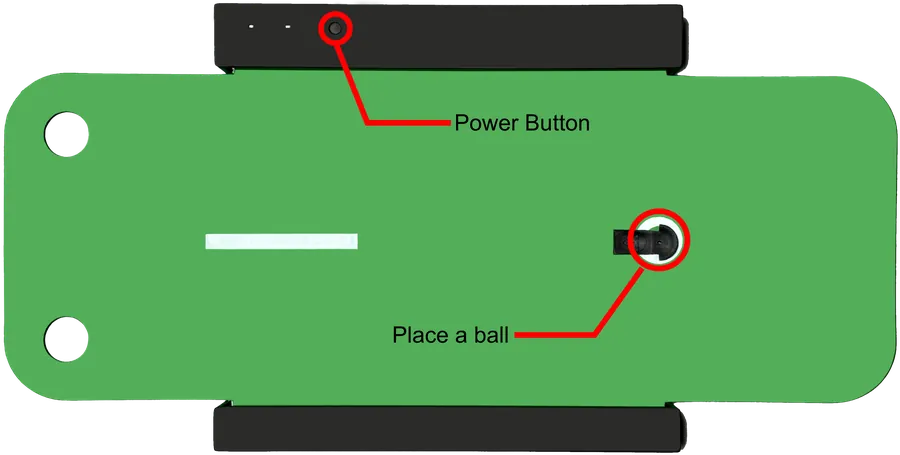
Use it with the OnePutt device to access Play Mode, Practice Mode, and Training Plan — with no monthly subscription.


Start with the basic setup, then learn how to choose and use the different app modes.
See the first steps: power on, connect the app, place the ball, and start practicing.
Learn about Practice Mode and Play Mode so you can choose the right training style for your goal.


Start data-driven putting practice at home with ONEPUTT. Buy on Shopee or chat with our team before you decide.